Neural-interface hardware, EEG signal processing, and software for interactive applications.
Mindset Technologies · Founder and lead engineer · March 2026 to now
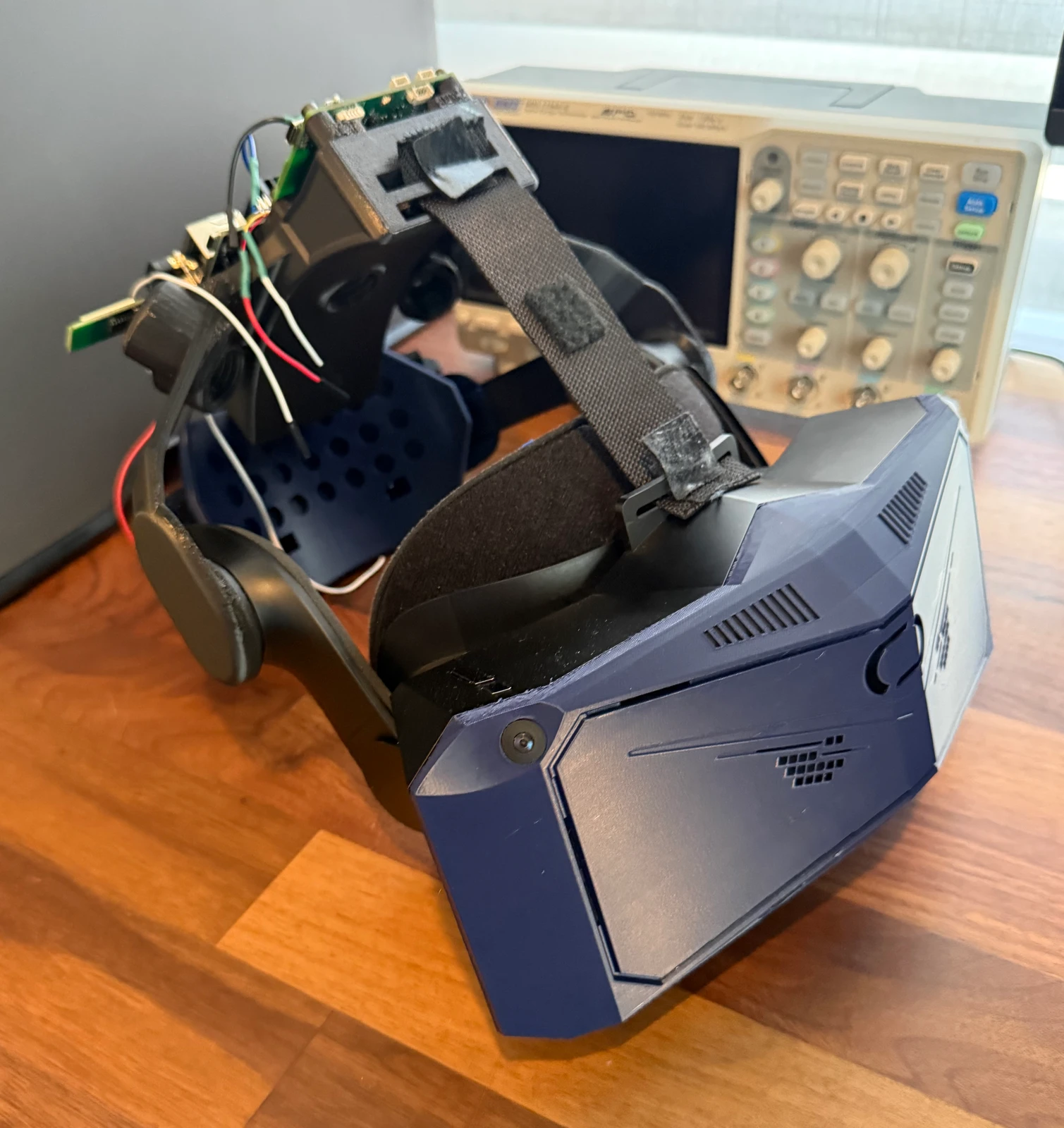
Headset prototype integrating commercial sensing and compute hardware. The custom EEG board design is separate work.
PROJECT
NEU-01
TOOLS
KiCad · CUDA · C++ · Python · Linux · OpenXR · Unity · Unreal
From the signal to the system
Neural-interface hardware and software, from acquisition electronics to the applications that use the signals.
Hardware
EEG acquisition design in KiCad covers the circuit, board layout, electrical rules checks, and simulation. The headset prototype brings commercial sensing and compute hardware into one physical assembly.
Signal processing
CUDA and C++ process EEG signals on the GPU. Python interfaces support acquisition, classification, and recording inspection on Linux.
Application integration
C and C++ interface development for Unity, Unreal, and OpenXR explores applications in VR, spatial computing, and accessible input. The integration uses the Khronos Group’s OpenXR SDK under the Apache 2.0 licence.
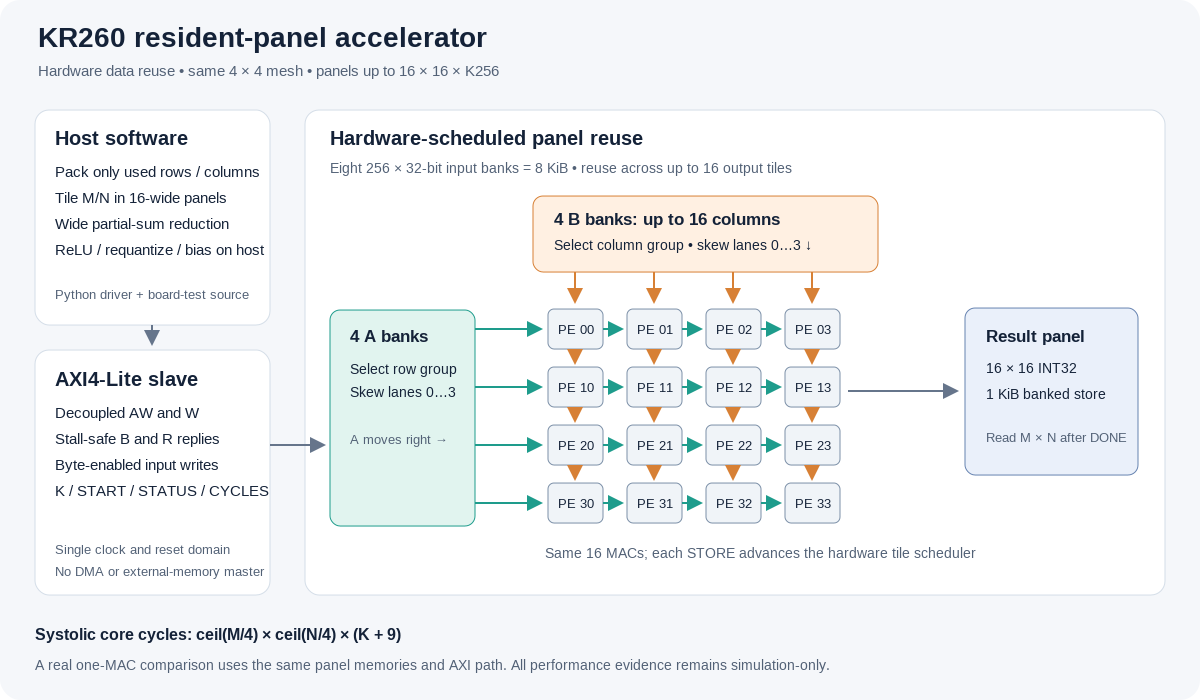
A standalone signed INT8 accelerator with INT32 accumulation and an AXI4-Lite interface. Hardware schedules up to 16 × 16 output panels on the same 16-MAC array, reducing repeated transfers between Python and the simulated device.
Independent study targeting Kria KR260 · Accelerator architecture and verification study · Concept developed August 2025
1.655× ideal / 1.906× stalled simulated-cycle ratio
Workload
18,900 dense outputs match RTL; 440/450 digits correct
The datapath
Sixteen processing elements pass A values right and B values down, with lane skew so corresponding operands meet on the same clock. Each cell keeps its own signed INT32 sum. The AXI4-Lite slave accepts address and data separately, supports byte writes, and holds responses stable under backpressure.
The v2 design has 8 KiB of banked input storage and a 1 KiB result store. One command covers up to 16 rows and 16 columns, with a reduction depth of at most 256. Larger reductions return partial sums to Python, which accumulates them with wide integers and checks the final INT32 range.
Why larger panels help
The first driver reloads both operands for each 4 × 4 output tile. A stronger software-only baseline keeps operands resident and traverses the tiles in a serpentine order. The comparison uses that baseline so savings from better software are already accounted for.
For a 16 × 256 × 16 multiplication, the improved v1 driver writes 4,352 input words. The v2 panel scheduler needs 2,048. The arithmetic array still has 16 MACs; its per-tile core count actually rises from K + 8 to K + 9. Fewer loads and commands produce the gain.
Simulated results
Under the ideal bus profile, the full-panel case falls from 18,080 to 10,922 cycles, a 1.655× baseline-to-v2 ratio. With fixed bus stalls, it falls from 50,208 to 26,336 cycles, or 1.906×. These counts include input transfers, control, polling, computation, and output reads.
Clocked RTL simulation, including programmed I/O. Both designs use the same bus profile. “Ideal” removes inserted stalls; “fixed stalls” is a sensitivity scenario, not a calibrated KR260 interconnect.
The benchmark contains 112 GEMMs across four configurations and two bus profiles. It includes a real single-MAC RTL engine with the same panel storage, bus, and driver. A separate replay reproduced 24 selected rows, including the unfavorable long-row case.
At 1 × 256 × 512, v2 is 3.40% slower under the ideal profile and 4.05% slower with stalls. Reloading the A row at panel boundaries outweighs the reduced command count. Short single-tile cases also regress. The full CSV retains every result.
Python execution, packing, and host-side arithmetic consume no modeled bus cycles between register operations. These ratios are not board latency, CPU speedups, or end-to-end inference time.
A two-layer INT8 workload
A 64 → 32 → 10 ReLU MLP runs on scikit-learn’s 8 × 8 digits dataset. Both dense layers execute through the production Python driver against clocked RTL. The second layer consumes activations derived from the first layer’s actual RTL outputs.
All 18,900 dense outputs match the independent integer reference. The host adds bias, applies ReLU and requantization, then performs the final argmax. Quantized predictions classify 440 of 450 held-out images correctly, or 97.78%.
The split uses 1,347 training images and 450 held-out images, randomly stratified with seed 260. Calibration uses only the training set. This is one documented split of the bundled digits dataset, not MNIST or a writer-disjoint benchmark. The float model gets 439/450; that one-image difference does not establish a general benefit from quantization.
Verification and hardware boundary
Independent numerical oracles check the RTL and driver. The core is cross-checked in Verilator and four-state Icarus simulation. Tests cover dimensions and signed extremes, bus stalls and byte strobes, reset and error handling, tails, repeated commands, and large reductions. Deliberately faulty RTL copies must fail active assertions. A local processing-element transition proof adds a narrowly scoped formal check.
The design has not run on a physical KR260. Vivado K26 synthesis, full-board integration, vendor place-and-route, timing signoff, a bitstream, and a matching Vitis build remain unperformed. Preliminary Yosys mapping is not a substitute for those checks.
Dataset: Alpaydin and Kaynak, Optical Recognition of Handwritten Digits, UCI, distributed with scikit-learn under CC BY 4.0.
PROJECT 03 / GPU COMPUTING
CUDA residual RMSNorm.
A fused residual-add and RMSNorm study on the DGX Spark’s GB10 GPU. Five kernel variants test when fewer launches and retained values help, and when they cost more than they save.
Independent study on DGX Spark · Kernel optimization and measurement
GPU-03 / GPU COMPUTING
PROJECT
GPU-03
TOOLS
CUDA C++ · FP32 / FP16 · NVIDIA GB10 · PyTorch · Compute Sanitizer · Nsight Systems
EVIDENCE
Measured on DGX Spark
Target case
28.05 to 17.97 µs at FP16 256 × 8192
Correctness
1,920 cases per dtype in each native run
Repetition
Two native runs, 15 trials per measured case
The operation
For each row, add the input and residual in FP32, compute the mean of the squared sum, then normalize and multiply by gamma. FP16 inputs still use FP32 arithmetic before conversion to the output type. The contract returns the normalized output only; a caller that also needs the residual sum has a different workload.
Five ways to run it
The three-pass baseline launches separate add, reduction, and scale kernels. Its reduction is parallel. The alternatives combine the operation into one launch: reread the inputs after reduction, retain values with 128 threads per row, assign one row to each warp, or retain values with 256 threads per row.
Adjacent lanes access adjacent columns. Warp shuffles reduce partial sums, and the block-per-row variants use shared memory and barriers to combine warps. Bounds checks cover odd widths and partial rows. Above 8,192 columns, both register variants explicitly fall back to the reread kernel.
A measured bottleneck
At FP16 256 × 8192, the 128-thread variant took 28.05 µs. A 256-thread follow-up halved the retained values per thread and reached 17.97 µs. The compiler reported 116 versus 64 registers per thread, with zero spills. A separate full rerun measured 28.00 versus 18.44 µs.
The reread kernel still had a slightly lower first-run median at 17.31 µs, with overlapping distributions. Reduced per-thread state is verified; a causal claim about achieved occupancy is not, because performance counters were unavailable.
Physical GB10 measurements. Median and p10–p90 across 15 trials, using reused buffers and CUDA graph sequences. Both runs used the same shared workstation and session.
Where fusion loses
At FP32 1024 × 4096, the tuned kernel measured 236.00 µs versus 343.52 µs for three passes. At a single row of 4,096 values, it regressed to 4.92 µs versus 3.68 µs. One block gives the GPU much less parallel work.
Compiled PyTorch also won several comparisons. In the same Python harness at FP32 1 × 4096, torch.compile measured 2.77 µs, the tuned CUDA kernel 4.90 µs, and eager PyTorch 8.74 µs. Rankings changed with shape and timing distributions often overlapped. There is no overall speedup claim over compiled PyTorch.
Checks and limits
Each final native run passed 1,920 cases per dtype against the CPU reference, checking input preservation and output canaries. Four Compute Sanitizer runs, covering memcheck and synccheck for both dtypes, reported zero errors. The evidence audit accounted for 15,750 timing samples across the two native runs and one Python comparison.
Correctness checks covered ordinary calls and warmup graph outputs; every timed replay was not checked individually. Nsight Systems captured 21 kernel launches. Nsight Compute could not access performance counters, so actual DRAM traffic and achieved occupancy remain unmeasured.
The resident vLLM service remained running. These are shared-workstation observations with unfixed clocks and warm reused buffers, not service latency or a production dispatch policy.
Evidence
The plot is generated from the retained raw trials, with the complete native and PyTorch timing data available below.
An 8-bit SystemVerilog ALU runs in the Kria KR260's FPGA fabric. A Python test runner on the board's Linux side uses AXI GPIO to drive inputs and verify the results.
Independent project · RTL design, board setup, and testing · September 2026
All 524,288 operand and op-code combinations passed
Timing
Met the 100 MHz interface clock in Vivado
The datapath
The ALU is built up in layers, each a small SystemVerilog module:
A one-bit full adder.
An 8-bit ripple-carry adder made of eight full adders, with each carry feeding the next bit.
An add/subtract unit. For subtraction it inverts B and sets the carry-in to 1, so A − B becomes A + (inverted B) + 1 and the same adder does both jobs.
The ALU, which picks the result from a 3-bit op code.
Op code
Operation
Carry flag
000
ADD
Set when the sum needs a ninth bit
001
SUB
Set when no borrow was needed
010
AND
Always clear
011
OR
Always clear
100
XOR
Always clear
101 to 111
Unused, result is 0
Always clear
The zero flag is set whenever the result is 0. The ALU is purely combinational, with no clock or internal state.
From Linux to the fabric
The KR260 pairs ARM cores running Linux with FPGA fabric. A small adapter connects the ALU to an AXI GPIO block:
Software writes one word: A in bits 7 to 0, B in bits 15 to 8, and the op code in bits 18 to 16.
Software reads one word back: the result in bits 7 to 0, carry in bit 8, zero in bit 9, and a fixed signature in the upper bits so the test script can reject a design with a different register layout.
A Python script on the board’s Linux side reaches those registers through Linux UIO. The board’s DFX Manager loads the ALU design and can restore the previous one afterward.
Verification
The simulation testbench and the on-board script both check every combination of the two 8-bit operands across all eight op-code values against a reference model. That is 256 × 256 × 8 = 524,288 cases, including the three unused codes, which must return 0. All 524,288 cases passed on the physical KR260.
The routed Vivado design met timing on the 100 MHz clock that drives the AXI interface, with positive setup and hold slack. Because the ALU is combinational between the GPIO registers, that is a statement about the interface, not a clock rate for the ALU itself.
PROJECT 05 / HOMEBREW HARDWARE
6502 homebrew computer.
I built the original 6502 computer from scratch without a kit in ninth grade, from September 2021 to February 2022. It has custom clocking, address decoding, memory banking, and memory-mapped I/O.
Independent project · Hardware build, debugging, and assembly programming · v1 · September 2021 to February 2022
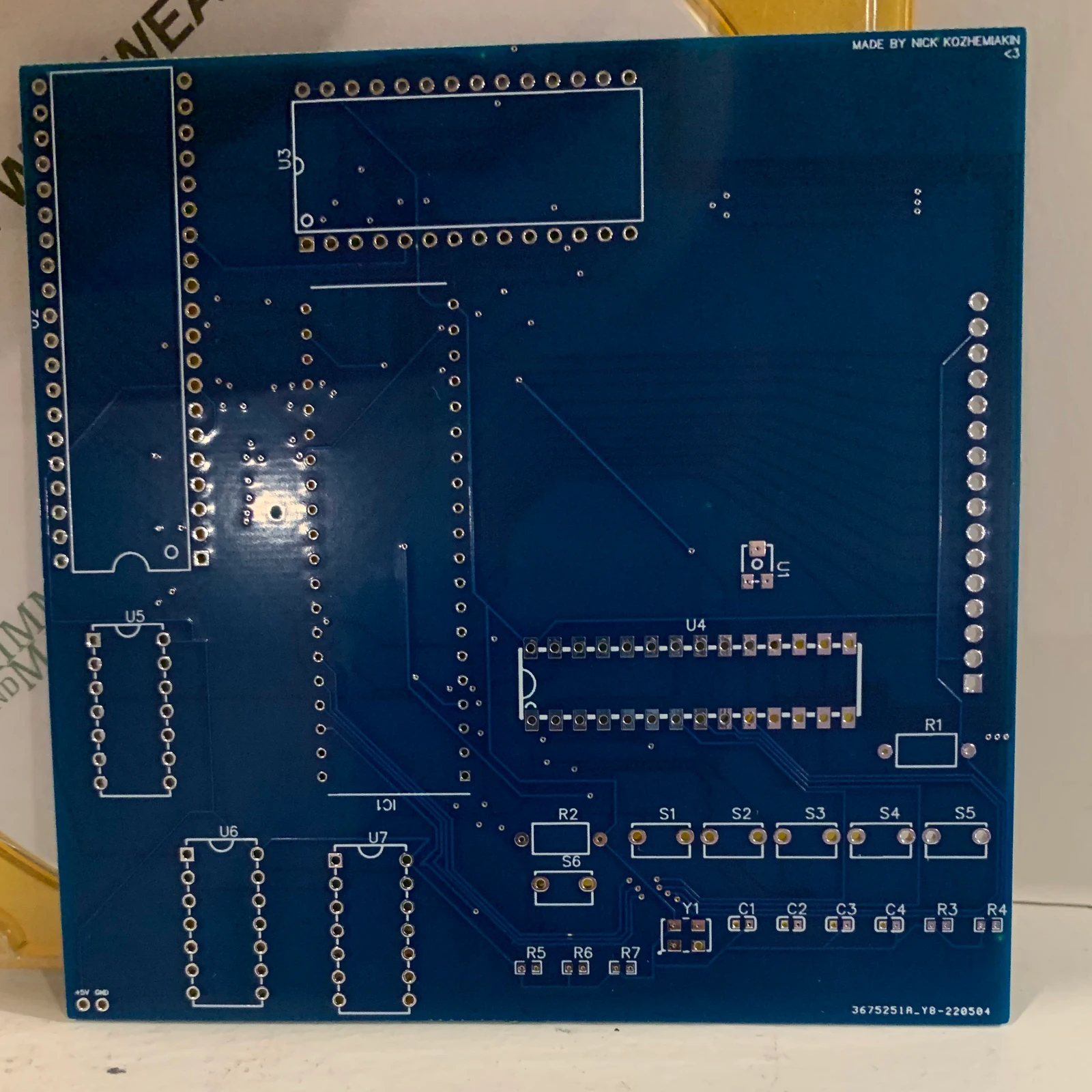
The unpopulated custom PCB, before assembly.
PROJECT
CPU-05
TOOLS
6502 assembly · Oscilloscope · Logic analyzer
v1: The original build
I built v1 in ninth grade, from September 2021 to February 2022.
An oscilloscope and logic analyzer supported hardware debugging. Programs were written in 6502 assembly, working directly with memory and memory-mapped I/O.
v2: Later keyboard and graphics revision
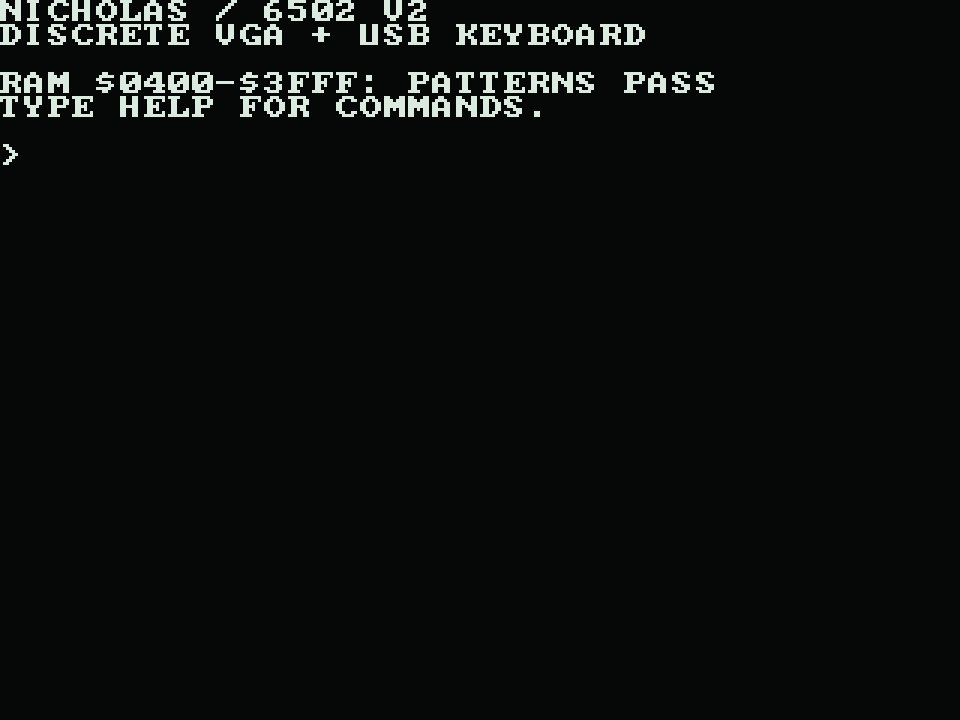
The later, completed v2 design uses KiCad and adds a separate USB keyboard bridge, a discrete-logic VGA card, and a 6502 monitor ROM. The display design uses a 320×240 bitmap framebuffer with a 40-column text console. Counters, SRAM, and a shift register generate the image; the keyboard bridge handles USB separately.
Firmware and digital models have been tested in software. Explore the completed KiCad boards in the 3D workbench.
v2 boot ROM output from software emulation.
PROJECT 06 / LOCAL-FIRST SOFTWARE
Halden.
Halden runs conversational memory and voice locally and supervises coding-agent tasks. Its Engineering Studio produces schematic, PCB, and CAD drafts with checks before human review.
Independent project · Designer and developer · July 2026
SQLite with keyword and vector search under a token budget
Delegated work
Supervised coding-agent runs, checked by the server's own builds and tests
Studio
Schematic, PCB, and CAD outputs, each checked before review
Where it started
I was inspired by Jarvis when I was young. In eighth grade, I built a simple chatbot that parsed a question, called the WolframAlpha API to do the math, and returned the response.
I’ve kept developing the idea since then. That first chatbot was the starting point; the local assistant and engineering tools described here came later.
Contribution
Designed and built the backend, dashboard, memory and retrieval layer, voice pipeline, coding-agent supervision, and Engineering Studio.
How it is organized
Conversation. One agent loop serves typed chat and voice. Voice is another front end to the same loop: speech-to-text with faster-whisper, the agent’s reply streamed sentence by sentence to a local text-to-speech model, with interruption support that cancels generation.
Persistent context. Memory lives in SQLite as distilled facts rather than raw transcripts. Each turn gets a context assembled under a fixed token budget from core memory, a rolling summary, and retrieved memories. Retrieval combines full-text keyword search with vector search and merges the two rankings. If the vector extension is missing, it falls back to keyword search instead of failing.
Delegated work. Heavy coding tasks go to an external coding agent that Halden starts as a supervised process and can pause or stop. Light tasks go to local workers that have no tool access. The server runs the task’s build, test, and lint commands itself and keeps the output, so a run is judged by its checks rather than by the agent’s own summary. A run with no checks is reported as having nothing to verify.
Engineering workspace. The Studio handles circuits, boards, and mechanical parts (below).
Between the agent loop and any tool sits a policy layer. Every tool action is scored for risk, the session has a permission mode, and anything that touches the physical world asks for confirmation.
Engineering Studio
Schematics. A model writes circuit code in SKiDL or atopile. It compiles inside a Docker sandbox with no network access and capped resources, and the Studio stops if the sandbox is unavailable. The netlist renders to an SVG schematic, and each revision is graded pass, warn, or fail from electrical rules checks and ngspice simulation.
PCBs. Placement, KiCad board synthesis, autorouting with FreeRouting, and design rules checks produce a first-pass layout and fabrication files. Every output carries a note that the board needs human routing review before it is ordered.
CAD. A model writes build123d part code against a written spec. The sandbox exports the part, measures its bounding box, volume, and holes, and a grader compares those measurements to the spec. The loop repeats until the checks pass or requests human review.
Bench handoff. Simulations that pass become steps in a bench test plan, with a PyVISA script generated for a lab computer.
The Studio builds circuits from known reference blocks and produces first-pass boards and simple parametric parts for review.
Hardware in the loop
Halden can only flash registered boards, and registration requires confirmation. A firmware image has to match the board’s target, and its checksum is recorded and checked again by a small agent that runs next to the hardware and exposes only a few fixed commands. Each flash, power cycle, or test needs a fresh confirmation tied to one board and one image.
Decisions
Local first. Models, memory, speech, and retrieval run locally. Only delegated coding runs leave it.
The server checks the work. A coding agent’s report is treated as a claim. The server runs the checks and keeps their output as the record of what happened.
Fail closed. A missing sandbox, missing checks, or an unregistered board stops the action instead of falling back to something less safe.
PROJECT 07 / HARDWARE / SOFTWARE
NOVA RISC-V computer.
NOVA runs a two-core RISC-V system on a Kria KR260. Open-source VexRiscv cores and a LiteX interconnect support a custom operating system, while an FPGA GPU renders a windowed desktop and textured 3D graphics.
Independent project · Project lead, board bring-up, and hardware testing · September 2026
Two VexRiscv RV32IMAFDC cores with an MMU and floating point
On the board
Passed a 13-check acceptance run after a full reboot
Build
Meets timing at 50 MHz, about 45,000 LUTs
What runs on the board
Processor. Two VexRiscv cores implementing RV32IMAFDC, with multiply and divide, atomics, compressed instructions, a hardware floating-point unit per core, an Sv32 MMU with machine, supervisor, and user modes, and coherent instruction and data caches.
System on chip. A LiteX interconnect with boot ROM, SRAM, timers, an interrupt controller, a UART console, and a 64-bit AXI path to the board’s DDR memory.
Operating system. A custom kernel with timer preemption across both cores, a separate address space for each process, full integer and floating-point context switching, system calls, process launch and kill, a kernel pipe for messages between processes, RAM-backed files, and a static ELF loader, so new programs can be compiled and run without rebuilding the kernel.
GPU. Two parallel raster engines run vertex and fragment shaders in Q16.16 fixed point, with perspective correction, texture sampling, depth testing, and a double-buffered 640 × 360 frame in RGB565.
Desktop. A window manager running in user mode, with Notes, Calculator, a process monitor, a terminal, and a 3D Studio window.
The board’s ARM processor loads the design, provides DDR access, and relays pixels and keyboard and mouse input to a browser viewer. It does not render the desktop or run the shaders.
Board acceptance
After a full reboot of the KR260, an acceptance run passed all 13 of its checks, including:
Processes running on both cores, with both timer interrupt counters advancing.
Arithmetic, floating-point, RAM-file, and matrix checksums, plus six numerically checked floating-point stress processes.
A message pipe between processes on different cores.
A user process that writes to kernel memory is stopped while the shell keeps running.
Separate data and BSS for independently loaded ELF programs, and rejection of a malformed ELF file.
An application denied GPU and input access when it lacks permission.
A full frame read back from the FPGA’s video memory, the calculator answering hardware input, and a shader-rendered frame that changes over time.
The run’s hardware counters reported zero GPU errors and zero DMA capture errors.
The build
The routed design meets timing at 50 MHz with positive slack. It uses about 45,000 LUTs, 364 DSP slices, and 56 of the device’s 64 UltraRAM blocks.
Contribution
Set the system goals, chose a custom operating system over Linux for this version, brought up the KR260, and ran and reviewed the board tests.
PROJECT 08 / HARDWARE / SOFTWARE
HAVOC VR haptic gloves.
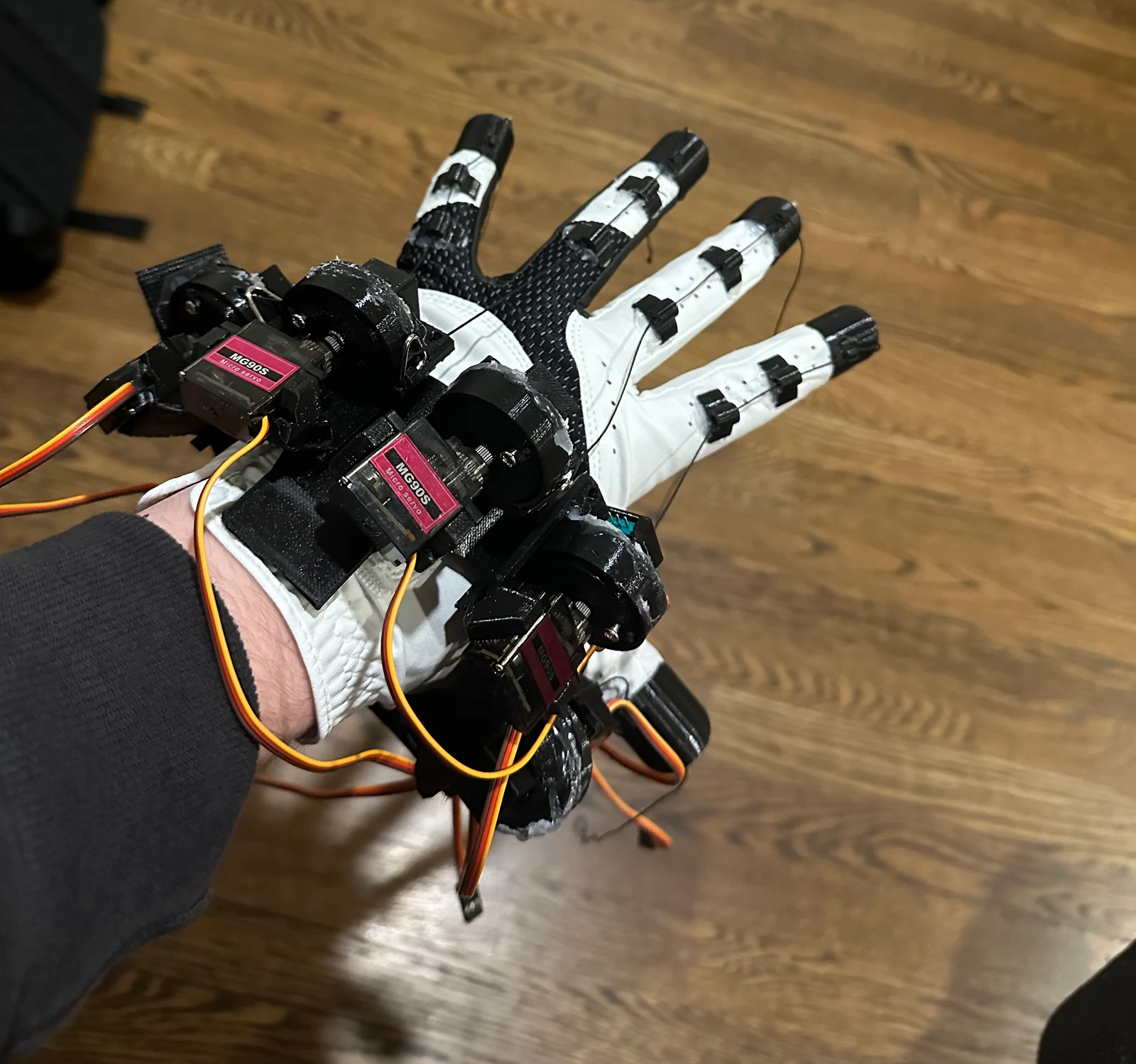
HAVOC uses two feedback mechanisms. A TENS unit stimulates muscle groups in the arm, while motors and strings resist finger closing in response to the VR scene.
Independent project · Hardware build and testing
Servo motors pull strings routed through the finger guides.
PROJECT
LAB-08
TOOLS
VR · Motors · Mechanical linkage · TENS unit
Virtual contact affects how far the fingers can close, providing resistance when interacting with an object.
Both mechanisms were built and tested for an MIT application portfolio.
PROJECT 09 / HARDWARE / SOFTWARE
Payment-terminal test fixture.
During my Aurus internship, I designed a solenoid-driven, microcontroller-controlled test rig to detect faulty payment-terminal inputs. Python automation handled repeatable test cycles and measurement logging.
Aurus, hardware and robotics engineering internship · Intern · June 2024
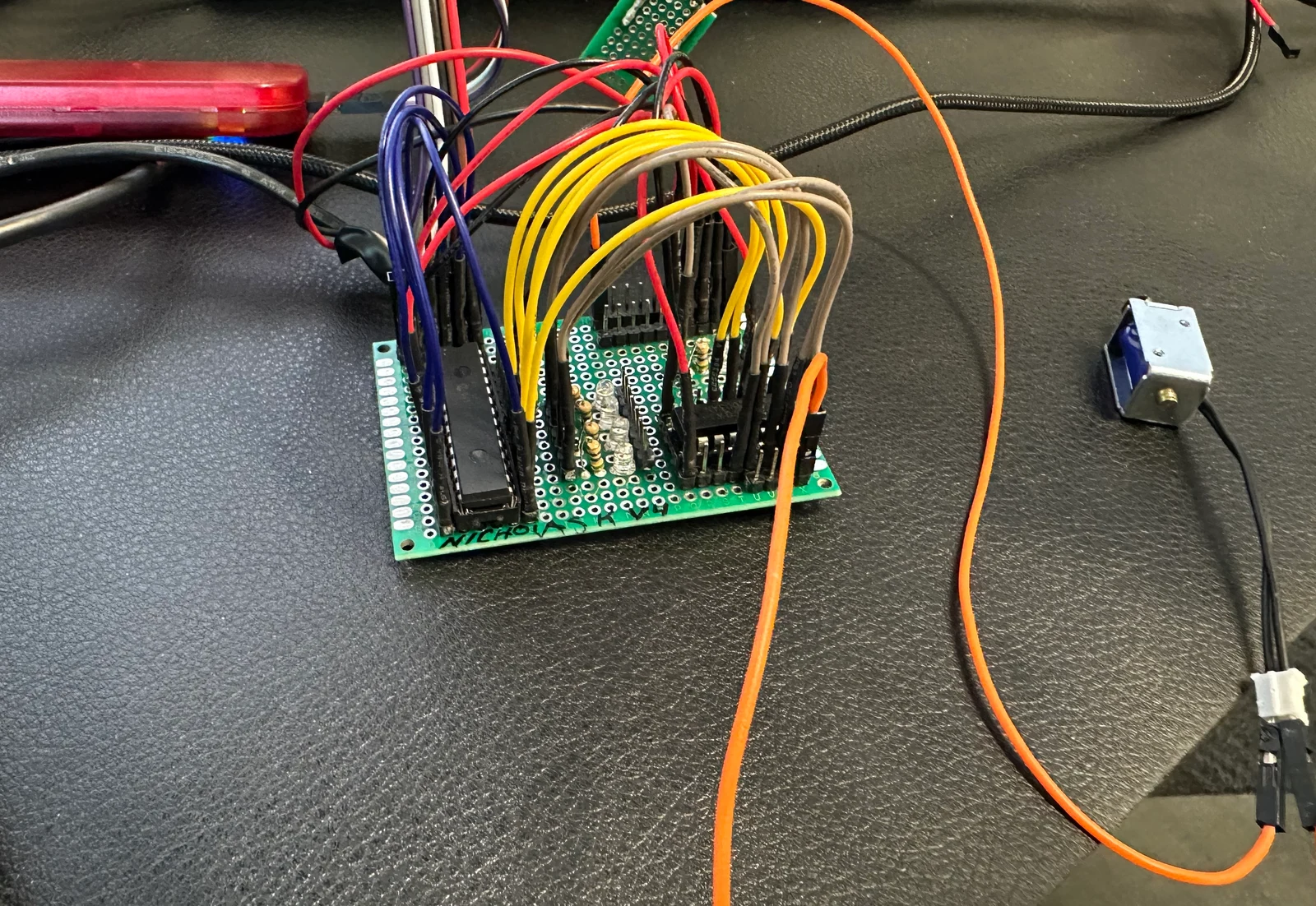
The wired control prototype and solenoid on the bench.
PROJECT
LAB-09
TOOLS
Python · Microcontroller · Solenoids
Prototype electronics
I built the control electronics on perfboard, connecting the microcontroller and solenoid hardware. The photos show the wired prototype and individual boards from the build.
PROJECT 10 / SIGNAL / HARDWARE / SOFTWARE
Myograsp.
An EMG signal-processing pipeline built with Holoscan and CUDA, connecting acquisition and replay input to processing and control interfaces.
Independent project · Designer and developer · June 2026
LAB-10 / SIGNAL / HARDWARE / SOFTWARE
PROJECT
LAB-10
TOOLS
NVIDIA Holoscan · CUDA · C++ · Python · TensorRT · ADS1299 · UART
PROJECT 11 / HARDWARE
Quadruped leg prototype.
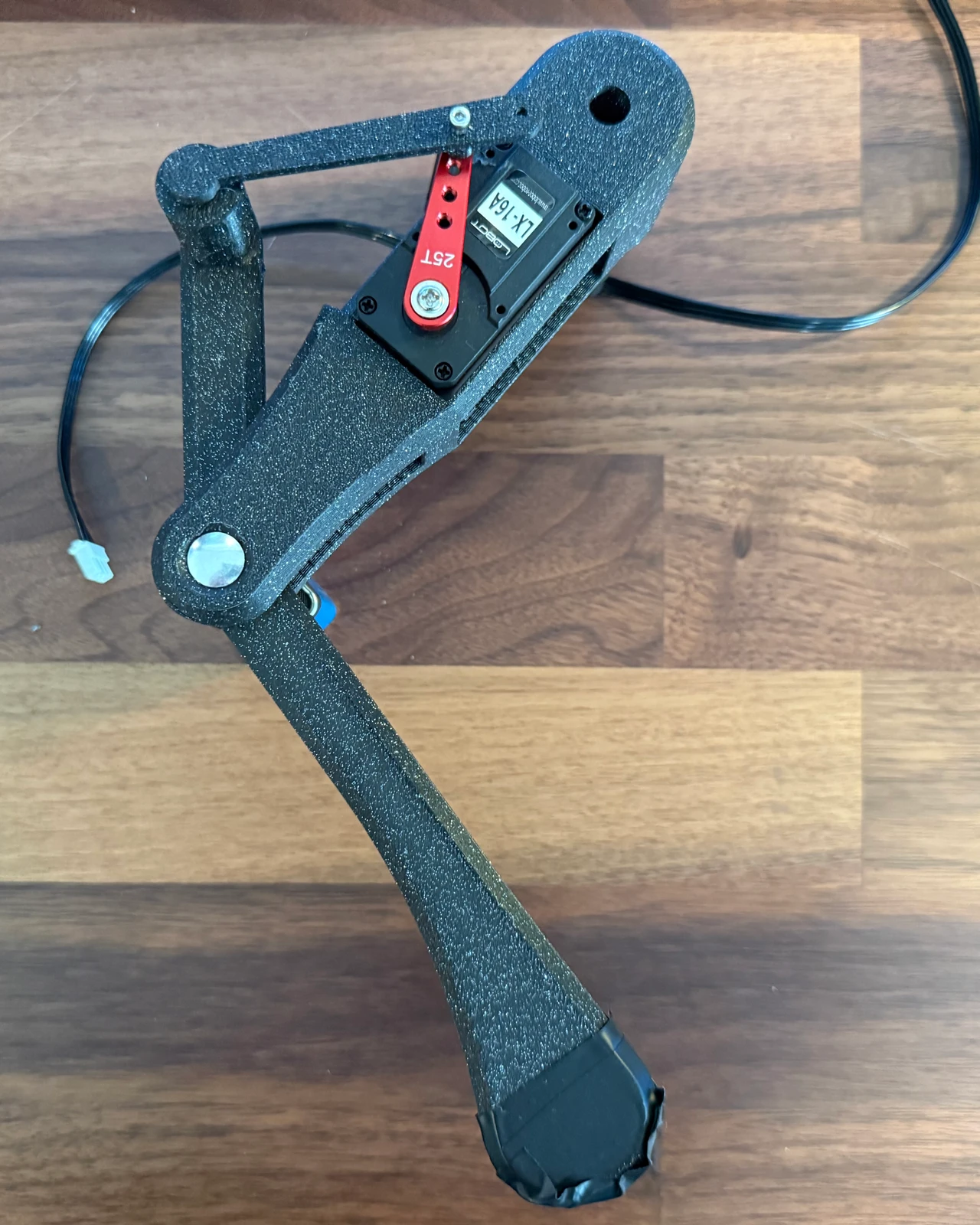
I built this quadruped leg prototype in January and February 2023, with servo-driven joints and printed mechanical parts.
Independent project · Leg prototype · January to February 2023
A single leg prototype with printed parts and servo actuators.
PROJECT
LAB-11
TOOLS
Servo motors · Printed parts · Mechanical assembly
The photograph shows the single-leg assembly, with servo actuators connected through printed mechanical parts.
PROJECT 12 / SOFTWARE
Familiar.
Familiar uses screen context to help someone work through an application. The native client provides screen context, guided interactions, and controls for changing modes or stopping a task.
ClawComp at Link Ventures · Developer of the native client and agent loop · May to June 2026
LAB-12 / SOFTWARE
PROJECT
LAB-12
TOOLS
Swift · SwiftUI · AppKit · Accessibility API · ScreenCaptureKit · Node.js · TypeScript · Supabase
Platform
Native macOS app with a Node backend
Modes
Guide, Agent, and Chat
Stopping
Global stop shortcut, per-action time cap, and a watchdog
I built Familiar with a teammate for ClawComp, a competition hosted by Link Ventures.
Contribution
Developed the native Swift client, screen-context and targeting code, agent loop, and cancellation and recovery logic. A teammate built much of the notch interface, the theme, and the run history and replay.
How context reaches the assistant
The Mac app reads the frontmost window through the macOS Accessibility API and captures the screen with ScreenCaptureKit. It sends the goal and that context to a backend, which calls a model and returns one step at a time. Each step’s target is found by its Accessibility label first, with a vision fallback that is checked against the real interface element before it is used. A privacy setting lists apps Familiar will not read.
Three modes
Guide only points. A ghost cursor shows where to click and a short bubble says what to do. The app waits for the user’s click, or for the expected app to open, before moving to the next step.
Agent moves the real cursor and performs the step. It stops on an approval card when the model marks a step as irreversible.
Chat has no cursor. Answers draw on the current screen and a searchable history of earlier screens.
Staying oriented and stopping
A widget at the top of the screen shows the current mode and progress. A global shortcut cancels any run and releases the cursor. Every action has an 8-second cap, and a watchdog notices when a run stops making progress and shows a card with Retry, Skip, and Stop instead of leaving the app frozen. Accessibility calls have a short timeout so one unresponsive app cannot stall the loop.
Decisions
Pointing and acting are separate modes. Guide never moves the cursor. Taking control is an explicit switch to Agent mode.
Accessibility before vision. Targets come from the Accessibility tree. Vision is a fallback, and its answer has to match a real element on screen before it is used.
PROJECT 13 / SOFTWARE
Compute Mesh.
Compute Mesh coordinates GPU jobs across a private group of computers. The coordinator, worker, and client paths handle job state, model availability, failure handling, and usage accounting.
Independent project · Designer and developer · April 2026
FastAPI with SQLite for jobs, workers, and a credit ledger
Execution
Each job runs on one worker through Ollama
Clients
React control UI in Swift and Tauri desktop shells
Contribution
Designed and implemented the coordinator, worker, command-line client, and desktop shells.
Job lifecycle
Submit. The coordinator checks the requester’s credit balance and reserves the job’s cost in an append-only ledger. A job for a model that is not on the allowlist is refused here.
Queued. Jobs wait in order of arrival.
Assigned. Workers poll the coordinator and say which models they can run. A worker under its job limit claims the oldest job it supports. The claim happens inside a locked database transaction with a status check, so two workers polling at the same moment can never take the same job.
Done. The worker posts its output and is paid from the reserved credits.
Failed and refunded. If the worker’s own allowlist rejects the model, the job fails and the requester gets a full refund.
Back to the queue. A job held by a worker for longer than the timeout returns to the queue for another worker, and its credits stay reserved.
Completions and failures are only accepted from the worker that holds the job.
Decisions
One job, one worker. Each job runs on a single machine, so every job has exactly one owner at a time.
Worker polling. Workers ask for work. The coordinator never connects to a worker, and a worker that goes quiet stops claiming jobs.
Check the model three times. The allowlist is checked at submission, at assignment, and again on the worker.
One interface, two shells. The control UI is a single React app. On macOS a Swift shell hosts it in a WKWebView and starts the local processes, and a Rust and Tauri shell does the same on Windows and Linux.
Cluster planning
A separate placement planner estimates how model layers could be divided across several machines. It checks group size, network latency between members, and model support, then records a plan for how the model’s layers would be divided. Jobs in this mode are refunded rather than executed.
PROJECT 14 / SOFTWARE
Daily agent briefing system.
A TypeScript reporter reads structured OpenClaw task logs and produces email and voice summaries through Inkbox. Daily reports track completed tasks, warnings, errors, and delivery history.
Cursor Boston Hack-a-Sprint · Designer and developer · April 2026 · Cursor Boston Hack-a-Sprint winner
An HTML email every day, and a phone call when something failed
History
Daily counts and delivery flags in Inkbox Vault
I built this system for Cursor Boston Hack-a-Sprint in April 2026 and was one of the winners.
The task-log contract
Each agent appends one JSON object per task to a log file named for the day. An entry records the agent’s name, a timestamp, a status of success, error, warning, or skipped, a short task description, and free-text details. A small command-line writer rejects entries with missing fields or an unknown status, so the reporter can rely on the shape.
The daily run
A launchd job starts the reporter each morning through a wrapper script.
The reporter reads the day’s log, counts errors and warnings, and loads the previous day’s counts for comparison.
A model writes the HTML summary, and the reporter sends it from an Inkbox agent identity. A day with no entries sends a short fixed note.
If there were errors or warnings, the reporter also has the model write a short spoken script. It starts a local WebSocket server, exposes it through ngrok, and Inkbox places a phone call that streams the script to text-to-speech.
The run stores that day’s counts and whether the email and call went out in Inkbox Vault. Running again on the same day updates that day’s entry.
A history command prints those stored days as a table. Only counts and delivery flags are stored, not the logs themselves.
Model choice
One setting chooses the model. A value with an ollama: prefix sends requests to a local Ollama server through its OpenAI-compatible API. Anything else goes to Anthropic.
Demo data
The sample logs in the project are synthetic: invented entries across eight fictional agents.
PROJECT 15 / SOFTWARE
Koda.
Koda is a terminal coding assistant written in Go with Bubble Tea. Each turn, it decides whether a local model is enough or the request should go to a remote one, and the model works through a small set of tools with fixed limits.
Independent project · Designer and developer · April 2026
LAB-15 / SOFTWARE
PROJECT
LAB-15
TOOLS
Go · Bubble Tea · Ollama · LM Studio · OpenAI-compatible APIs
Routing
A scoring function picks a local or remote model each turn
Tools
Nine, with file tools confined to the project folder
Tests
Unit tests for the router, tools, and config
Routing
Before each model call, Koda scores the request from three signals: prompt length, a count of words that suggest hard tasks (refactor, debug, design) against easy ones (list, show, grep), and how many turns deep the conversation is. Low scores go to a local model through Ollama or LM Studio if a quick connection check reaches it. High scores, or an unreachable local server, go to a remote model. The interface shows which model was chosen and why.
Bounded tools
File tools (view, write, edit, glob, grep) resolve every path, follow symlinks, and refuse anything that lands outside the project folder.
Shell commands run without a shell, require user approval, and are killed after a timeout.
Web fetches must use HTTPS, are refused for private and loopback addresses, need approval, and have size and time limits.
Tool output goes back to the model labelled as data, not instructions.
A subagent tool runs one level of child agent with the same tools, and its result is trimmed before it returns.
Decisions
The router is a small heuristic rather than a model call, so it runs on every turn at almost no cost and its reason fits in one line of the interface. A Go rewrite of the original Python version ships as a single binary.
PROJECT 16 / SOFTWARE
OpenClaw admin console.
An extension of xmanrui's OpenClaw-bot-review, adding sign-in, roles, configuration changes, and workflows to its read-only dashboard.
Extension of an open-source project · Developer of the extensions · March to April 2026
Sign-in and roles, config safety, bot cloning, workflows
Contribution
App data. Prisma with SQLite for users, configuration snapshots, bot clones, prompt runs, threads, workflows, and workflow runs.
Sign-in and roles. Credential sign-in with hashed passwords, a first-owner setup route, and four roles from owner down to viewer, checked on the routes that modify data.
Safer configuration writes. Before saving the OpenClaw configuration file, the console checks that the file has not changed on disk since it was read, saves a snapshot of the old version with a diff, and writes the new file atomically. A rollback endpoint restores a stored snapshot.
Bot cloning. A wizard that previews a copy of an existing bot and then creates it.
Workflows. Sequential runs across several bots, stored with their results, with pages to define, run, and review them.
Workflow view in Pixel Office. During a run, each step’s status appears on the bot characters in the upstream Pixel Office view.
Audit logging for console runs, threads, and workflows.
PROJECT 17 / SOFTWARE
Slack standup agent.
A Slack bot that pulls blockers and the people needed out of standup posts, emails them, replies in the thread, and follows up on old blockers.
Independent project · Designer and developer · April 2026
LAB-17 / SOFTWARE
PROJECT
LAB-17
TOOLS
Python · Slack Bolt · Anthropic API · Inkbox
PROJECT 18 / SIGNAL / SOFTWARE
Audio visualization.
A small Python experiment that plots a WAV recording as a waveform and a spectrogram with NumPy and Matplotlib.
Independent project · Designer and developer · 2023
LAB-18 / SIGNAL / SOFTWARE
PROJECT
LAB-18
TOOLS
Python · NumPy · Matplotlib
THE PERSON BEHIND THE PROJECTS
Nicholas Kozhemiakin.
I build neural interfaces, digital hardware, and the software that brings them to life.
B.S. in Electrical and Computer Engineering · Northeastern University · Expected April 2029
From the circuit to the experience
My work moves between hardware and software: EEG acquisition boards, FPGA logic, GPU signal processing, and interfaces for the people who use them. I like understanding the whole system and building the pieces that connect it.
Where I spend my time
Bang & Olufsen Boston
Sales and Project Management · May 2026 to present
Develop audiovisual proposals and coordinate orders and installations around room layouts and networking needs
Built a Next.js and TypeScript platform linking customer records, product configuration, quotes, and follow-up
Mindset Technologies
Founder and Lead Engineer · March 2026 to present
Lead brain-computer interface development across hardware, signal processing, and application integration
Built Python and Linux acquisition and classification workflows and C and C++ interfaces for OpenXR, Unity, and Unreal
Northeastern University, Erdogmus Lab
Undergraduate Researcher, Neural Interfaces · January 2026 to present
Investigate low-cost EEG acquisition, embedded signal processing, and neural-interface classification
Aurus Inc.
Hardware and Robotics Engineering Intern · June 2024
Designed a solenoid-driven, microcontroller-controlled test rig to detect faulty payment-terminal inputs
Developed Python automation for repeatable test cycles, measurement logging, and failure analysis
Away from the bench
Building synthesizers and custom instruments, woodworking, and espresso brewing.